ESP32 OLED Stacker Game
Wiring Schematic
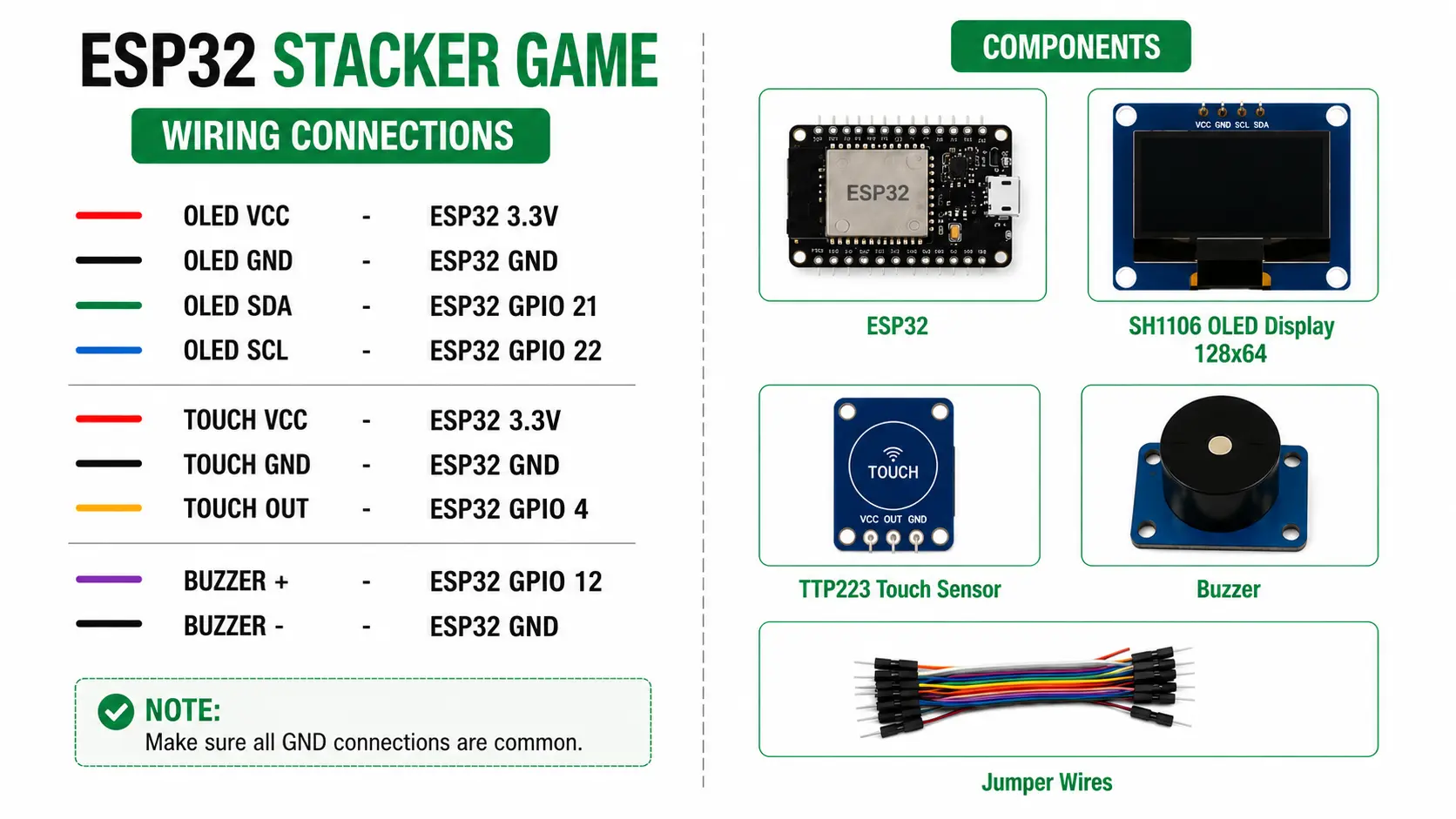 View full-size circuit ↗
YOUR PROJECT LEARNING PATH
Build it with confidence.
Project overview
Know what you’re building before you start wiring.
Build a Stacker arcade game using an ESP32 development board and a 128×64 OLED display. Touch the sensor to place moving blocks, preserve their overlapping sections, and build a tower toward the top.
The game features automatic overhang cutting, falling-block animation, screen shake, buzzer effects, a win screen, and a Game Over screen. Block movement becomes faster as the tower grows, increasing the timing challenge.
Disconnect USB power before wiring. Verify OLED voltage and check GPIO 12 boot behaviour with the buzzer connected.
Components required
Gather these parts before you begin.
Build the project
Work through one focused step at a time. You can revisit any step whenever you need.
Prepare the ESP32 and OLED Display
Disconnect USB power and place the ESP32, OLED, touch sensor, and buzzer on a stable surface. Identify each module's power, ground, and signal pins before beginning the wiring process.
The README specifies an SSD1306 128×64 I2C display at address 0x3C, but the supplied diagram labels the display SH1106. Verify the controller on your actual module.
Connect the OLED Over I2C
Connect OLED VCC to ESP32 3.3V, GND to GND, SDA to GPIO 21, and SCL to GPIO 22. Check module labels and ensure all ground connections are common before applying power.
The sketch uses Adafruit SSD1306 and Wire on GPIO 21 and GPIO 22. An SH1106-only module may require a different display driver.
Connect the TTP223 Touch Sensor
Connect TTP223 VCC to ESP32 3.3V, GND to common ground, and OUT to GPIO 4. Keep the signal wire secure and confirm the sensor produces a compatible HIGH logic level when touched.
The firmware detects HIGH on GPIO 4 as a touch and uses the same sensor to start, place blocks, and restart the game.
Connect the Buzzer and Install Software
Connect buzzer positive to GPIO 12 and negative to ESP32 GND. Install Arduino IDE, the ESP32 board package, Adafruit GFX, and Adafruit SSD1306 before compiling the supplied sketch.
The code includes its own buzzer engine and sound sequences. GPIO 12 is a boot-strapping pin, so check that the buzzer circuit does not interfere with startup.
Upload Firmware and Play the Game
Upload stacker-game.ino and open Serial Monitor at 115200 baud for diagnostics. Touch the sensor on the splash screen to start, then touch again to stop and place each moving block.
The first block is four columns wide, and overhangs are removed after placement. Reaching row twelve wins; a placement with no overlap causes Game Over, and touching restarts the game.
Software & tools
Install these before uploading the firmware.
Expected output
Compare your build with the result described here.
After upload, the OLED displays the STACKER start screen with a moving demo block and a PRESS TO START prompt. Serial Monitor at 115200 baud shows an error only if OLED initialization fails.
During play, the block moves horizontally, and touching places it and cuts any overhang. Movement becomes faster as rows increase, with a minimum delay of 25 milliseconds; reaching twelve rows wins.
Troubleshooting & fixes
Choose the issue that best matches what you’re seeing.
01OLED remains blank or graphics look corrupted
Check OLED VCC, GND, SDA on GPIO 21, and SCL on GPIO 22. Confirm the actual display controller and address match the SSD1306 configuration, then inspect jumper wires and headers.
02Touch sensor does not register input
Check TTP223 VCC, GND, and OUT connections. Confirm OUT reaches GPIO 4 and becomes HIGH when touched; if your module uses active-LOW output, change TOUCH_ACTIVE_STATE in the sketch.
03ESP32 fails to boot or buzzer remains silent
Verify buzzer positive connects to GPIO 12 and negative to GND. GPIO 12 is a boot-strapping pin, so the attached circuit can affect startup on some boards; check boot reliability and buzzer compatibility.