ESP32 OLED Flappy Bird Game
Wiring Schematic
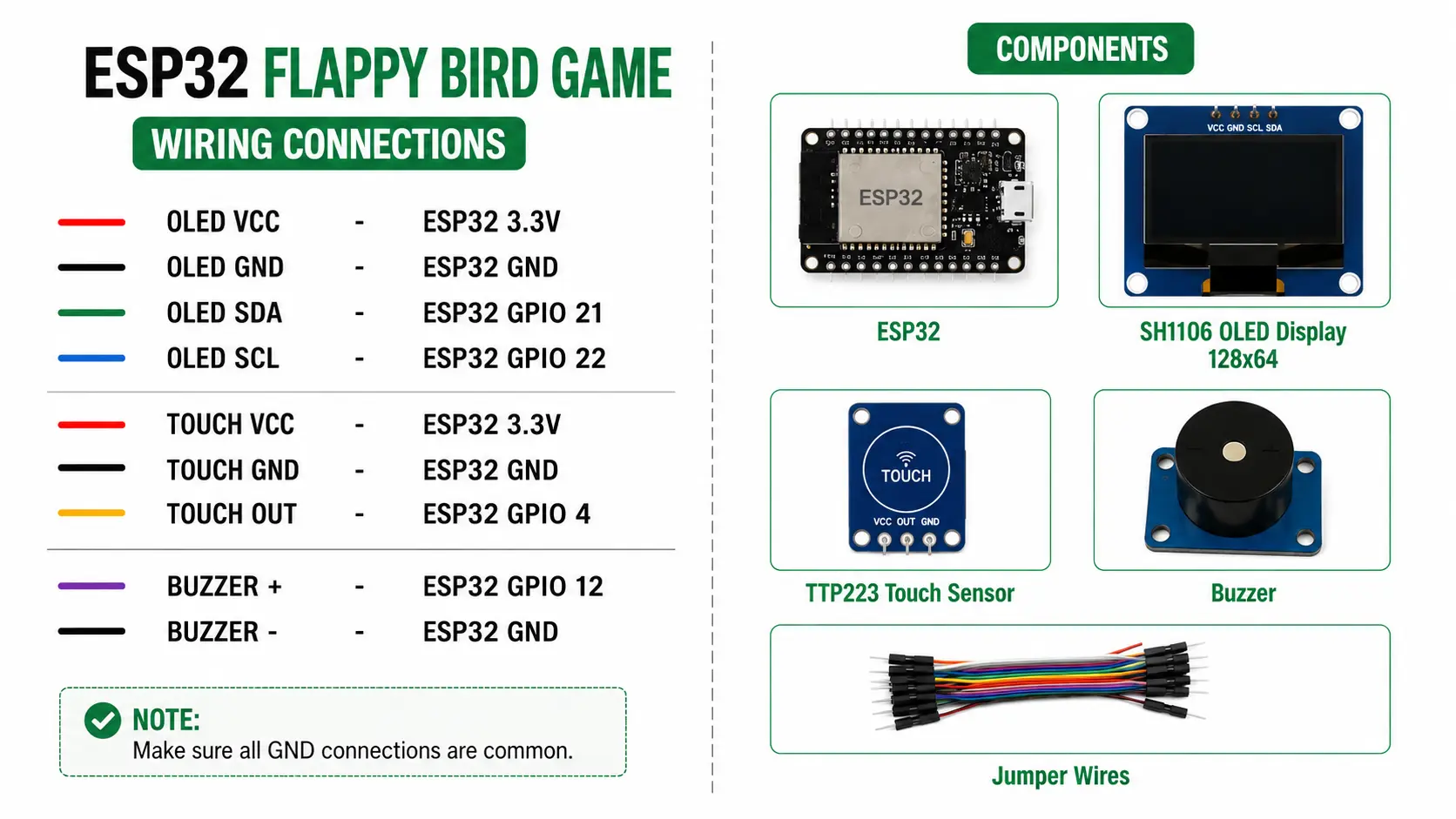 View full-size circuit ↗
YOUR PROJECT LEARNING PATH
Build it with confidence.
Project overview
Know what you’re building before you start wiring.
Build a Flappy Bird-style game using an ESP32 development board and a 128×64 SSD1306 OLED display. Touch input lets you flap the bird, avoid moving pipes, and chase higher scores.
The game includes collision detection, an animated bird, progressively faster pipes, a best-score display, a Game Over screen, and touch-to-restart controls. It runs locally without Wi-Fi or internet access.
Disconnect USB power before wiring. Verify OLED voltage and connect the ESP32, display, and touch sensor to common ground.
Components required
Gather these parts before you begin.
Build the project
Work through one focused step at a time. You can revisit any step whenever you need.
Prepare the ESP32 and OLED Display
Disconnect USB power and place the ESP32, OLED display, and HW-139 touch sensor on a stable surface. Identify each module's power, ground, and signal pins before starting the wiring process.
The README specifies a 128×64 SSD1306 I2C display at address 0x3C. The supplied diagram says SH1106, so verify your actual display controller before wiring.
Connect the OLED Over I2C
Connect OLED VCC to ESP32 3.3V, GND to GND, SDA to GPIO 21, and SCL to GPIO 22. Check each module label carefully before applying power to avoid wiring errors.
The sketch initializes Wire on GPIO 21 and GPIO 22 and uses Adafruit SSD1306 at address 0x3C. An SH1106-only module may need a different display driver.
Connect the HW-139 Touch Sensor
Connect touch sensor VCC to ESP32 3.3V, GND to common ground, and DO to GPIO 4. Keep the signal wire secure and ensure the sensor output is compatible with the ESP32 input.
The firmware detects a HIGH signal on GPIO 4 as a touch. If your sensor outputs LOW when touched, invert the active-state comparison in the sketch.
Install Libraries and Upload Firmware
Install Arduino IDE, the ESP32 board package, Adafruit GFX, and Adafruit SSD1306. Open flappy-bird.ino, select ESP32 Dev Module and the correct serial port, then compile and upload the sketch.
The sketch initializes Serial at 115200 baud and prints OLED ERROR if display initialization fails. It contains no buzzer control or sound effects, despite the diagram showing a buzzer.
Start Playing and Control the Bird
Power the ESP32 and wait for the FLAPPY BIRD start screen. Touch the HW-139 sensor to begin, then tap again to flap and guide the bird through moving pipe gaps without hitting boundaries.
Each passed pipe adds one point. Pipe speed increases from one to two pixels per frame at score 20; collisions end the game, and touching again restarts it.
Software & tools
Install these before uploading the firmware.
Expected output
Compare your build with the result described here.
After upload, the OLED shows the FLAPPY BIRD start screen, including the bird graphic and touch prompt. Touching the sensor begins gameplay, with the current score and best score shown above the play area.
The bird falls under gravity and rises when touched, while pipes move from right to left. Collisions with pipes, the ceiling, or ground trigger Game Over; touching again restarts the game, and the best score lasts only until reboot.
Troubleshooting & fixes
Choose the issue that best matches what you’re seeing.
01OLED remains blank or graphics appear corrupted
Check OLED 3.3V, GND, SDA on GPIO 21, and SCL on GPIO 22. Confirm the module uses an SSD1306 controller at address 0x3C and inspect jumper wires for loose connections.
02Touch sensor does not trigger jumps
Check HW-139 VCC, GND, and DO connections. Verify the output reaches GPIO 4 and becomes HIGH when touched; if the module uses active-LOW output, change the touch comparison in the sketch.
03Expected buzzer sounds are missing
The wiring diagram includes a buzzer, but the README component list and game sketch do not implement sound. Remove the buzzer from the diagram or add and test sound support separately before claiming audio features.