ESP32 Smart Battery Dashboard V1
Wiring Schematic
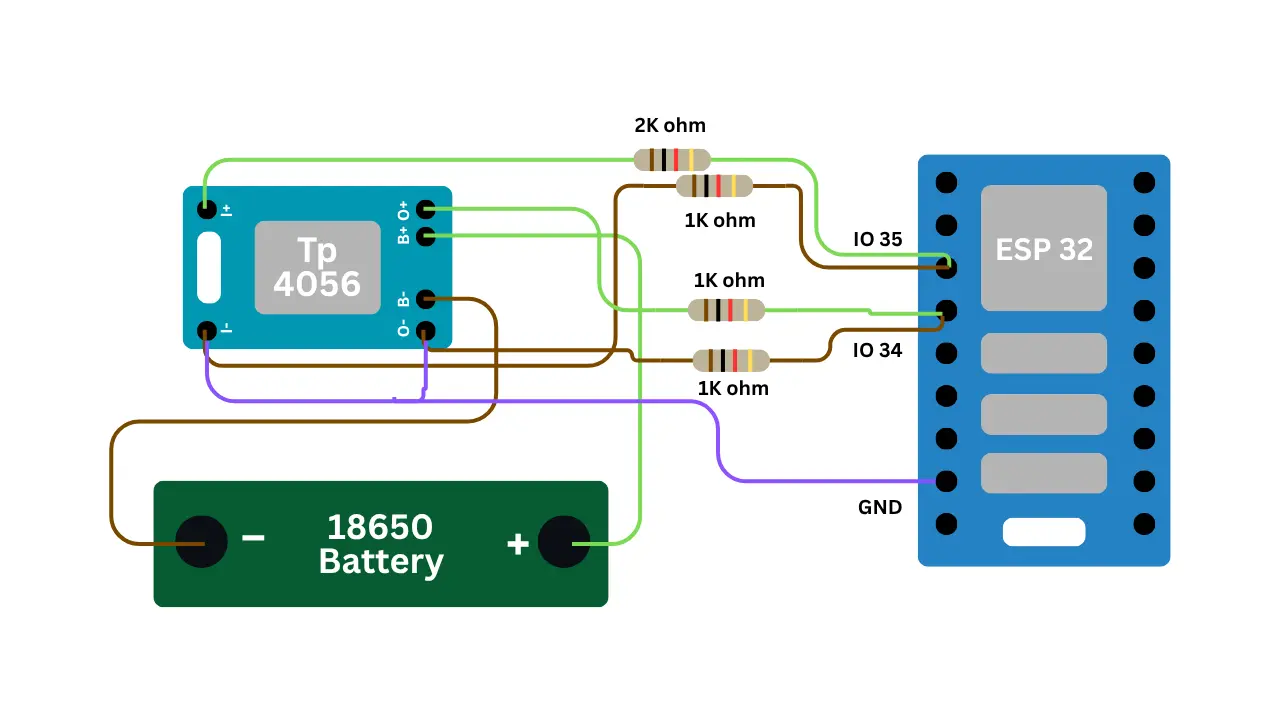 View full-size circuit ↗
YOUR PROJECT LEARNING PATH
Build it with confidence.
Project overview
Know what you’re building before you start wiring.
Build a wireless battery-monitoring system using an ESP32 for practical IoT and electronics learning. It measures battery voltage through an ADC input and monitors charging status while providing remote access through a responsive browser dashboard.
The dashboard displays estimated battery percentage, voltage, charging status, and animated battery graphics. Wi-Fi connectivity lets users view updated readings from phones or computers on the same network.
Never connect a battery directly to an ESP32 ADC pin. Keep divider output below 3.3 V and use battery protection.
Components required
Gather these parts before you begin.
Build the project
Work through one focused step at a time. You can revisit any step whenever you need.
Prepare the Circuit and Shared Ground
Disconnect USB power and place the ESP32, breadboard, and monitoring components securely. Establish a shared ground rail for the ESP32, battery circuit, and compatible charging-detection hardware before connecting signal wires.
Connect ESP32 GND to the breadboard ground rail, and connect battery negative and detection-circuit ground to this same reference point.
Build the Battery Voltage Divider
Connect battery positive through a 2kΩ resistor to a junction, then connect that junction to GPIO34 and through a 1kΩ resistor to ground for divided ADC measurement of battery voltage.
This divider produces approximately one-third of the battery voltage at GPIO34; confirm the maximum possible input keeps the ADC pin below 3.3 V.
Connect the Charger Detection Circuit
Connect the output of a compatible charger-detection circuit to GPIO35, ensuring it supplies a safe digital logic level and shares the ESP32 ground reference for reliable status sensing.
Use a comparator or charger-module status output; never apply a battery or charger voltage directly if it exceeds ESP32 input limits.
Install Software and Configure Wi-Fi
Install Arduino IDE and the ESP32 board package, then select libraries or APIs supported by your installed core for Wi-Fi, HTTP serving, and ADC measurement before compiling the project firmware.
Enter Wi-Fi credentials in the sketch, select the correct ESP32 board and serial port, then upload firmware and open Serial Monitor at 115200 baud.
Open and Test the Battery Dashboard
Open Serial Monitor at 115200 baud, wait for Wi-Fi connection, and copy the printed IP address into a browser connected to the same network to access the dashboard.
Check voltage, estimated percentage, and charging status; readings should refresh periodically, with battery animations reflecting the detected state as the device continues monitoring.
Software & tools
Install these before uploading the firmware.
Expected output
Compare your build with the result described here.
After uploading firmware, open Serial Monitor at 115200 baud and observe Wi-Fi messages. Once connected, the ESP32 prints its local IP address, which you can open on a device using the same network.
The dashboard displays battery voltage, estimated percentage, and charging status alongside an animated battery graphic. Readings refresh regularly, and charging animations respond to the detection input when configured correctly and connected properly.
Troubleshooting & fixes
Choose the issue that best matches what you’re seeing.
01Battery voltage readings or percentage appear incorrect
Verify the 2kΩ and 1kΩ resistor positions and divider calculation. Measure GPIO34 voltage with a multimeter, confirm it stays below 3.3 V, and adjust percentage calibration for your battery chemistry.
02ESP32 fails to connect to Wi-Fi
Check the network name and password, including capitalization. Confirm the network is available and within range, restart the board, and inspect Serial Monitor messages for connection errors or a missing IP address.
03Dashboard readings or charging status do not update
Confirm GPIO35 receives a valid digital signal from the detection circuit and shares ground with the ESP32. Check network access, browser refresh requests, JSON responses, and Serial Monitor readings.